Parallax

A hybrid synthesizer built in layers. Stack analog, wavetable, sample and physical-model generators, shape them through two filters and three effect lanes, then move all of it with eight macros. The same engine runs in your DAW and in a browser tab.

Play it in your browser

Hear it

Factory presets, eight seconds each: one note, then a chord, then a short line. Every clip was rendered by the Parallax engine, the same one that runs in the plugin and in the browser.

  • Evolving Wavetable Pad Wavetable and analog. A wide wavetable pad that opens from a glassy shimmer into a warm, choir-like tone.
  • Wire Harp String model. A wire-strung harp. Detuned pairs of strings beat against each other inside a bright wooden soundboard.
  • Vox Formant Pad Formant filtering. A breathy choir pad made of vowel formants, synthesized from scratch.
  • Bass Sequence Sequencer. A monophonic bass line that jumps octaves, with acid-style accents.
  • Hammered Dulcimer String model. Double strings struck hard and beating slightly out of tune, in a resonant wooden box.
  • Digital Sequence Wavetable and sequencer. A stepped wavetable sequence whose timbre shifts on every step.
  • Analog Keys Analog. Mellow, detuned polyphonic keys with a filter that opens gently.
  • Legato Mono Lead Analog. A mono lead that glides between notes, with vibrato that comes in late.
  • Glass Pad Wavetable. A shimmer of high partials in wide stereo.
  • Koto Pluck String model. A bright string plucked near the bridge, with a tight wooden body.
  • Hard Sync Lead Analog. A hard-synced saw lead with a vocal snarl.
  • Digital Keys Wavetable. Crisp, glassy wavetable keys with a compact chorus shimmer.

One patch, end to end

This is the signal path of an example patch. Sound runs from the generators through two filters and three effect lanes to the master, and modulation reaches in from the macros and modulators. The rest of the page walks the same path from back to front: sources on the far plane, shaping in the middle, movement nearest to you.

Group 1Group 2FMNoteskeys, arp, sequencerMacrosLFOsEnvelopesStep modulatorsModulation matrixa depth for every routeWavetableAnalogString modelPiano model+ sample, granular, additive, spectral, noise, subFilter 1MG Low 12Filter 2PZ SVFLane 1per voiceDistortionEQLane 2after voice mixChorusDelayLane 3after voice mixReverbCompressorMaster Group 1Group 2FMNoteskeys, arp, sequencerWavetableAnalogString modelPiano model+ 6 moregenerator typesFilter 1MG Low 12Filter 2PZ SVFLane 1per voiceDistortionEQLane 2after voice mixChorusDelayLane 3after voice mixReverbCompressorMasterMacrosLFOsEnvelopesStepsMatrixroute depths

Read the drawing Each block links to the part of this page that explains it.

Signal flow of an example patch. Coloured tabs use the colour the interface gives that module type.

  • Audio
  • Notes
  • Control-rate modulation
  • Audio-rate modulation

Far plane

Sound sources

Stack generators and group them freely. Each group gets its own output envelope and its own route into the filters. Send one generator into another at audio rate and you have FM or phase modulation.

SignalModulation. A dot marks a strip whose screenshot shows a modulated control.

From Evolving Wavetable Pad: an analog oscillator and a wavetable in one group.

Two generator strips. The analog strip, red on its left edge, has an oscilloscope, waveform buttons and knobs for sync, unison, detune, pulse width, spread and blend. The wavetable strip, blue on its left edge, shows the current waveform, a view of the table's frames receding in depth, and knobs for position, unison, spread, band, detune and blend.

From Bowed Cello: the String model and the body it resonates in.

Two more strips. The String strip, pink on its left edge, has a string display and knobs for contact, damping, tension and coupling. The Body strip, tan on its left edge, shows the response of a cello body with knobs for size, resonance, tilt and mix.
Generator strips from two different factory presets, set one above the other here. The colour on a strip's left edge is its generator type, and this page uses the same colours.

Analog-style oscillators

Saw, square or pulse with adjustable width, triangle and sine. Sync and unison sit on the strip, next to the waveform buttons.
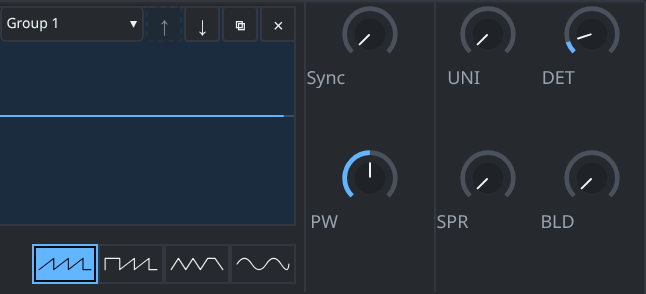
Close-up of the analog strip: four waveform buttons with saw selected, and knobs labelled Sync, UNI, DET, PW, SPR and BLD.
  1. Sync
  2. Unison and detune
  3. Waveform buttons
  4. Pulse width

Wavetable, with the editor built in

Scan through a table with the position knob. To make your own, open the wavetable editor: draw frames, morph between them, or edit their harmonics.
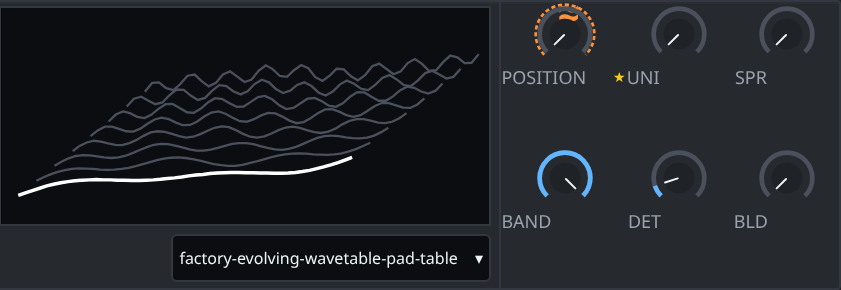
Close-up of the wavetable strip: a stack of the table's frames in perspective with the current frame highlighted, a table selector, and the position knob with an orange modulation ring.
  1. Frames in the table
  2. Position, modulated here
  3. Table selector

String: a physical model you pluck or bow

A modelled string with an acoustic body and sympathetic strings, plucked or bowed. It is behind the harp, dulcimer and koto demos below. The screenshot is the Bowed Cello preset.
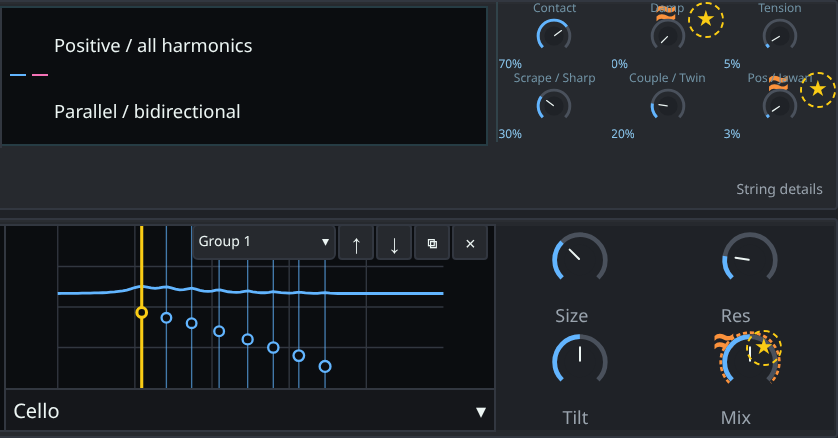
Close-up of the String strip and the Body strip below it: string knobs for contact, damping, tension, scrape and coupling, then a cello body response curve with knobs for size, resonance, tilt and mix.
  1. Contact
  2. Tension
  3. Body type
  4. Body mix, modulated here

Piano: hammers, dampers and a soundboard

The second physical model. Hammers strike the strings, dampers stop them, and a soundboard with sympathetic resonance carries the tone.

Samples, and five more generators

The sample player imports SFZ instruments. Granular, additive, spectral, noise and sub generators stack in the same rack as everything above.

Tabs of the source editors: Analog, Wavetable, Sample / Granular / SFZ, Noise, Content tools, Routing, ARP and scale.
The source editors, one tab per kind of source.

FM and phase modulation between generators

Route one generator into another at audio rate. This is the route in Velvet Electric Piano: linear FM with its own depth knob.

An audio-rate route panel outlined in green: 6 to 1, Linear FM, with a route depth knob, a 1-sample feedback switch and a Remove route button.
  1. Route type
  2. Route depth, modulated here
The left and right ends of one panel. Green marks an audio-rate route.

Every group ends in an output strip

An envelope with its own curve on attack, decay and release, then gain, pan, and a menu that sets which filters this group feeds.

Output strip of a generator group: envelope display, knobs for delay, attack, hold, decay, sustain and release with curve knobs, a Send to menu set to Filter 1 + Filter 2, gain and pan.
  1. Output envelope
  2. Curve for the attack
  3. Filter routing for this group
The left and right ends of the output strip.

Middle plane

Filters and effect lanes

Two filters, each with a choice of models, routable per generator group. After them, three effect lanes in a row. Each lane is its own chain of effects.

Two filters. Choose the model for each.

MG Low 12 and MG Low 24 are ladder-style low-passes. PZ SVF is a state-variable filter. Comb, formant, notch and shelving models are in the same menu. Each generator group has its own filter routing.

  • MG Low 12
  • MG Low 24
  • PZ SVF
  • Comb
  • Formant
  • Notch
  • Shelves
The two filter panels, yellow on their left edges. Filter 1 is set to MG Low 12 and filter 2 to PZ SVF. Each has cutoff, Q and gain knobs; filter 1's gain knob has an orange modulation ring.
  1. Model menu
  2. Orange ring: this knob is modulated
  3. Filter 2 runs a different model
Filter 1 in two halves, then the start of filter 2.

Three effect lanes in series, then the master

Lane 1 feeds lane 2, lane 2 feeds lane 3, and lane 3 feeds the master. Each lane is a chain of effects.

Switch a lane to Poly and it runs per voice, so every note gets its own delay or distortion. Leave it off and the lane works on the voice mix.

  • Delay
  • Chorus
  • Reverb
  • Distortion
  • Compressor
  • EQ
  • Resonator
  • Formant filter
The three effect lanes of the Velvet Electric Piano preset. Lane 1 holds a chorus, lane 2 a delay set to 130 milliseconds with ping-pong and spread switches, lane 3 is empty with an add button. Each lane header has Poly, mute and solo buttons. Below, each lane ends in gain and mix knobs and a Send To menu, set to Lane 2, Lane 3 and Master.
  1. Poly: this lane runs per voice
  2. Add an effect
  3. Lane 1 into lane 2
  4. Lane 2 into lane 3
  5. Lane 3 into master
The lanes of Velvet Electric Piano: the top and the bottom of the lane rack, with the empty space between them cropped out. A narrow screen shows lanes 1 and 2 of the three.

Near plane

Macros and modulation

Eight macros sit along the top of every patch. Behind them are LFOs, envelopes, step modulators and a modulation matrix. Knobs move on screen as they are modulated, so you can see what a route is doing. The orange line beside the cable starts here.

Eight macros on every patch

Every factory preset maps its eight macros, so the controls that matter for a patch are already at the top. These are the macros of the Bowed Cello preset.

The eight macros of the Bowed Cello preset: Bow Pressure, Bow Position, Rosin, Damping, Body, Tone, Space and Output, each with a knob and orange route dots.
  1. One orange dot per route from that macro
The macro strip from the top of the interface, split into rows to fit this page.

LFOs, envelopes and step modulators

LFOs repeat a shape. Envelopes run when a note starts, and you can edit the curve of each stage. Step modulators are there when a shape should move in steps.
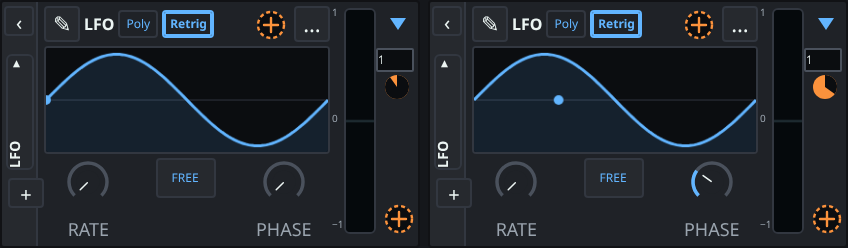
Two LFO panels side by side, each showing a sine shape, Poly and Retrig switches, a rate knob, a Free button and a phase knob.
  1. Rate
  2. Phase
The two LFOs of Evolving Wavetable Pad.

A matrix with a depth for every route

Each route has a source, a destination, its own depth and polarity. Routes run at control rate, in orange, or at audio rate, in green, which is how generators modulate each other for FM. This route is from Generative Motion.

One row of the modulation matrix: Route 1, marked Control, with source 1 random, destination Filter 1 cutoff, amount 1000 and polarity bipolar.
  1. Control-rate route
  2. Source
  3. Destination
  4. Depth of this route
  5. Polarity
One route of the matrix, shown as two halves.

Arpeggiator, note sequencer and tuning

Parallax has an arpeggiator and a note sequencer. Glide, unison, and legato or retrigger are on the main panel. For microtuning, load a .tun file or connect MTS-ESP.

The voice bar of the interface: Glide with a time of 40 milliseconds, Unison with voices, detune, spread and blend, Polyphony with 32 voices and Legato and Retrig buttons, and Pitch and Bend settings.
  1. Glide
  2. Unison
  3. Legato or retrigger

Master

Lane 3 hands the finished sound to the master, and from there it goes to your DAW or your speakers. This is where the cable ends.

Hear what comes out

Presets, and patches you can paste

Parallax ships with 48 factory presets in eight categories. Every one of them maps its eight macros, so each one has eight named knobs ready to turn.

  • Bass
  • Keys
  • Pads
  • Leads
  • Plucks
  • Sequences
  • FX
  • Drums
The preset browser's list, headed All presets, 48 items. The first eight rows are basses: Analog Sub Bass, Acid Bass, Reese Bass, Wobble Bass, FM Bass, Pluck Bass, Glide Mono Bass and House Bass, each with a one-line description.
The preset browser, showing the first eight of the 48.

Preset Codes

Any patch exports as a text code that starts with PRX1:. Paste it into a chat or a forum post. Whoever pastes it into Parallax gets the exact patch.

An example of what a code looks like. It is illustrative and will not load a patch.
PRX1:뭏띡큓쥏챐왲쌜뽛뺙흀뛫썀렒속향륽욗툇웭믎괰쵲쇏놎륦쬖퓿콺욙뼵탼낲둛뉌뛶욶윬륲뒓띙풓뻾싺댬빢쏍혿쵋팈삾넜훤늌먀눿녅튒쨏놿븹뀿칾컮꼤밃앃싿턤냉팎괻땘쀰쑼솑틒햠쥢잁윹쪇뺌휯딿돈쿁뻭솠킇쭳껦짝킿콞쮡쿞걅푙퀺꽼같쫉죱셿썺튜첪잸굱봌끅쀤쌡햢뼎귫죭췽쑪쿮쒽쿆럋쏩쫢뿛

One engine, two viewpoints

Parallax has a single DSP engine, written in Rust. It runs natively in the plugin and as WebAssembly in the browser, so a patch sounds the same in a DAW and in a browser tab.

Under CPU pressure, an overload guard sheds detail instead of crackling.

  • VST3
  • AU (macOS)
  • Standalone
  • Browser

One engineRust DSP

In your DAWVST3, AU on macOS, Standalone

In a browser tabThe same engine as WebAssembly

Open it and play a note

The browser version runs the same engine as the plugin, so what you hear there is what you get in a DAW.

Play it in your browser

Parallax is in development. Version 0.1.